
One system for everything the fire marshal's office does.
Inspections, operational and construction permits, enforcement, fire watches, contractor ITM reports and investigations, built on one record for every property in your jurisdiction, with a public portal and online payment in front of it.

Every property, once
Sites, the buildings on them and the tenants inside, with every permit, inspection, violation and case attached to the same record.
Not a module of something else
Built for prevention and code enforcement from the start, not a prevention screen inside a response records system.
Apply, upload and pay online
Businesses and contractors do the data entry through your portal; your staff decides what becomes part of the record.
Migrated, not abandoned
Data migration is part of every implementation, so years of inspections and permits come with you.
The whole office, on one platform.
A fire marshal's office runs more than inspections. A fire marshal management system should hold every program the office administers, so a property's history is complete wherever you open it.
Inspections
Annual, complaint and re-inspections on a phone or tablet, violations written from your own library with the code section, photos and signatures, recurring schedules, and a priority queue that says why each property is on it.
Operational and construction permits
Special events, tents, fireworks and pyrotechnics, mobile food vehicles, hazardous materials and every other permit type your fire code requires, each with its own application, documents and fee, plus plan review for construction.
Enforcement
Violation notices, proof of correction from the business, code enforcement cases with the orders your office issues, such as a stop work order, and fire watches logged round by round.
Contractor ITM reports
Sprinkler, alarm and suppression contractors file inspection, testing and maintenance reports online, and every deficiency stays on the property until it is corrected.
Fire investigations
NFPA 921 case management on the same property record, so an investigator sees the inspection history and an inspector sees the fires at the address.
The rest of the office
Preplans, hydrants and flow tests, public records requests, public education, an activity log, general billing and analytics across every module.

The record's Location card and the jurisdiction lookup, shown with sample data over Mapbox's map of a real place; every label is fictitious. Click the image to see them up close.
Every program writes to the same record.
The record is what makes it a system rather than a set of tools. A property is entered once, placed on the map and assigned its jurisdictions, and every permit, inspection, violation, case, fire watch, ITM report and investigation at that address attaches to it.
- Sites, buildings and tenants: the hierarchy inspectors work in, with what is recorded above and below a record shown on it.
- Jurisdictions from the map: county, precinct, municipality, district and response area assigned from the location, so every list and report can be cut by them.
- No duplicate addresses: a property that already exists at an address is found before a second one is created.
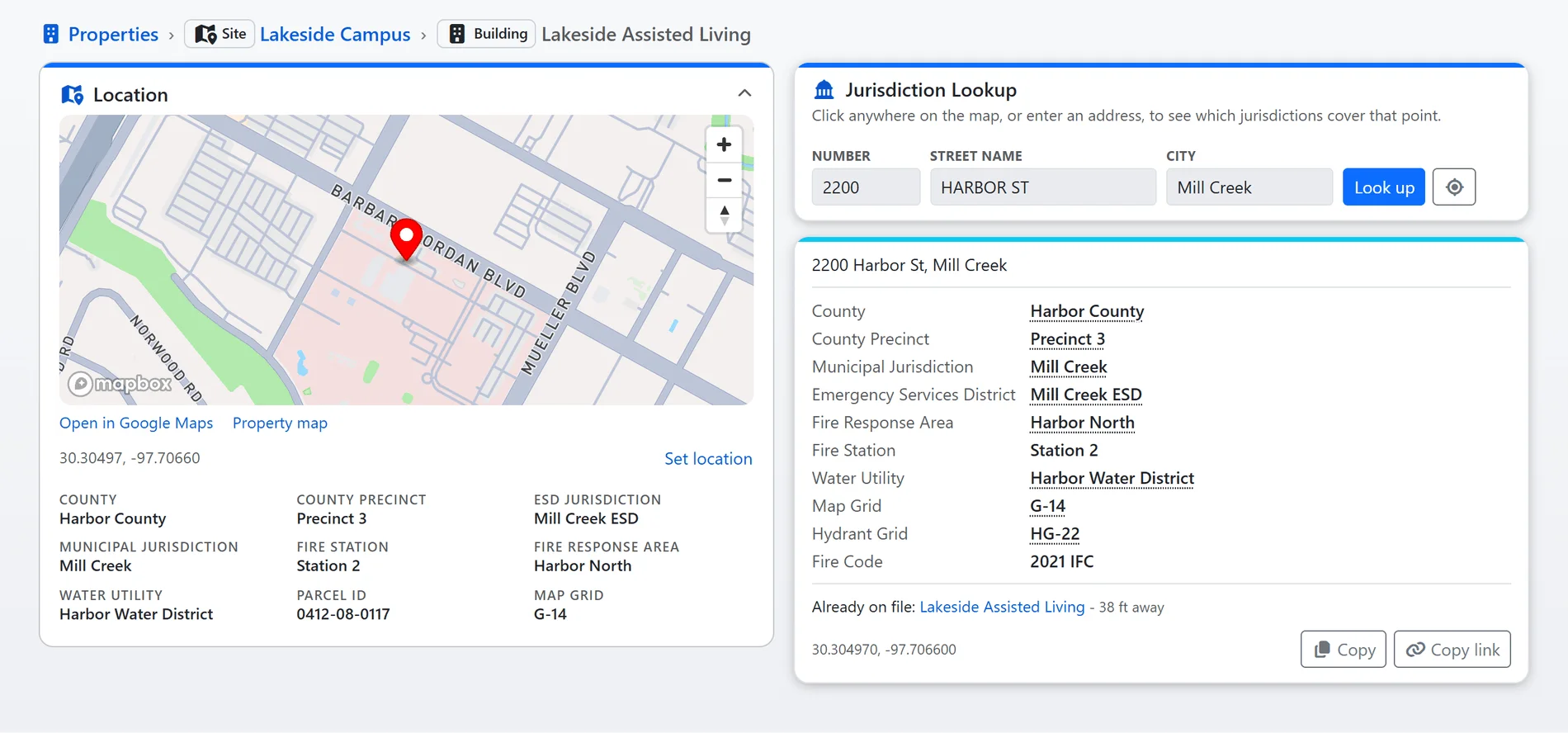
The Location card and the jurisdiction lookup with sample data over Mapbox's map of a real place; every label is fictitious.

Shown with sample data. Click the image to see the whole page.
The permit desk, with the public doing the typing.
Operational permits are where a fire marshal's office meets the public most often and collects much of its revenue. Each permit type has its own application, asking only the questions that type needs, listing the documents it requires, and pricing itself from the answers.
- An application per type: sections and fields switched on per permit type, from your configuration rather than a developer.
- Documents with the application: site plans, floor plans, insurance and certifications uploaded from a computer or a phone.
- Fees from the answers: by day, by tank, by area or by purpose, shown to the applicant before paying online.
- Renewal from the permit they hold: a type that allows renewal offers it in its own window and links the old permit to the new one.
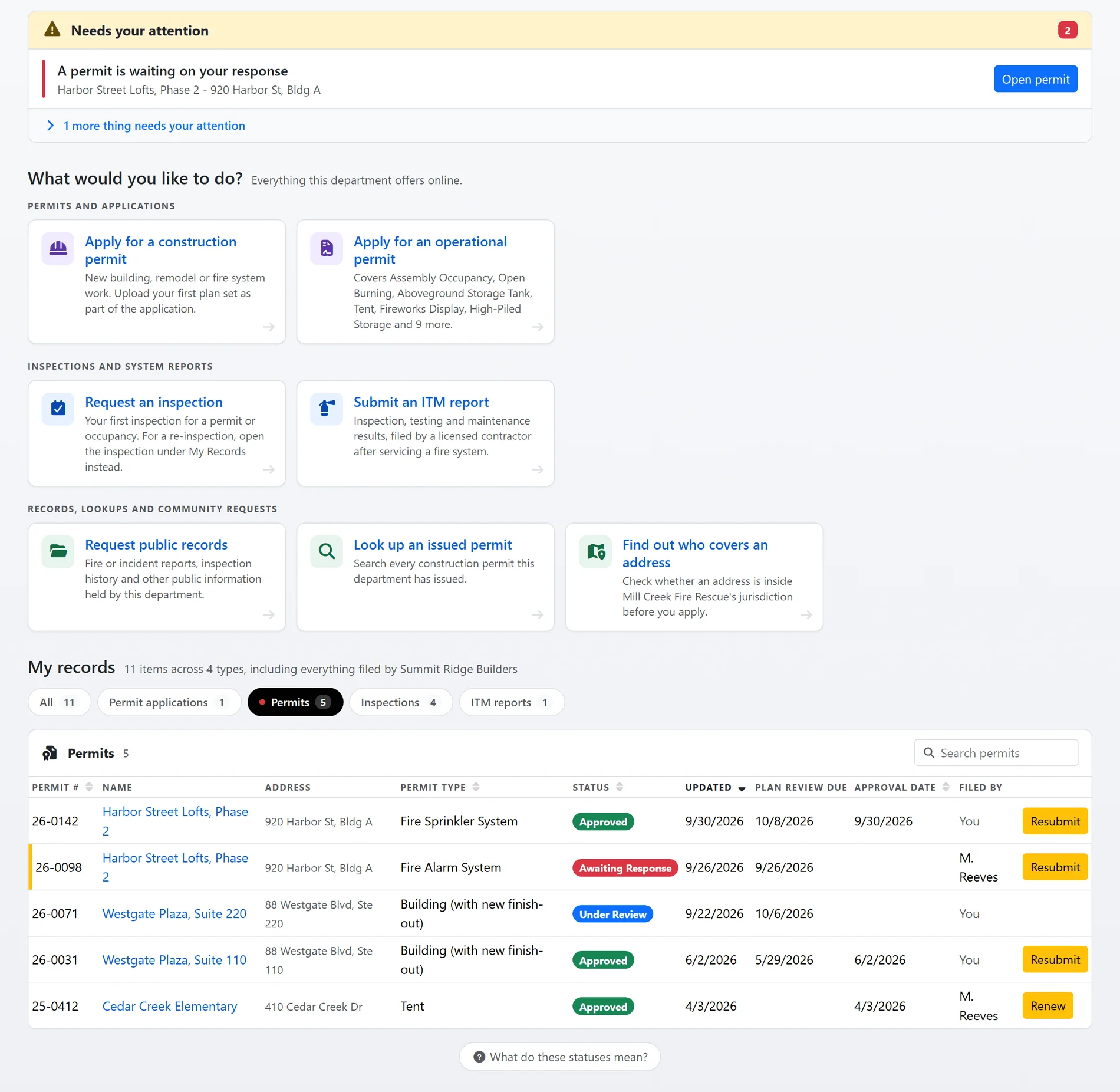
Shown with sample data.

Shown with sample data. Click the image to see the whole page.
A record that holds up when it is questioned.
Enforcement is only as strong as the record behind it. Every violation states the code section it cites, every change records who made it and when, and the time comes from the server in your jurisdiction's time zone, never from a device clock.
- Code citations on every violation: written from your own library, with the code text, so the notice says exactly what was required.
- Proof of correction: the business sends photos of the correction, your inspector accepts or declines each one, and the history keeps both.
- History on every record: status changes, notes, documents and payments with the user and time, and invoice numbers that are never reused or hidden.
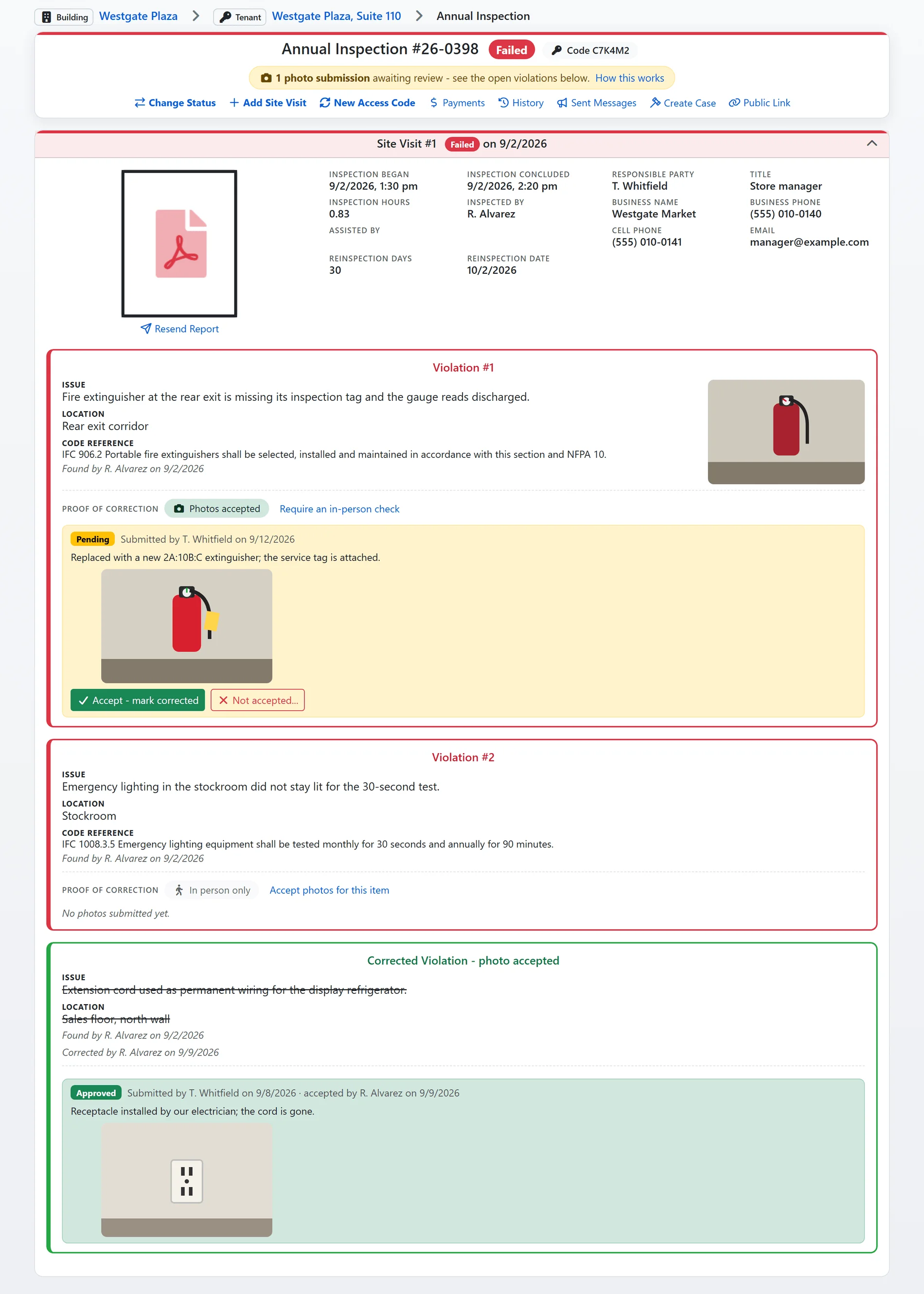
Shown with sample data.
Bring the history, connect the systems around it.
Most offices arrive from a prevention module inside a records system, a homegrown database or spreadsheets, often more than one at a time.
Data migration included
Properties, inspections, violations, permits and their documents are migrated as part of implementation. Historical data that does not map to a field is kept and reachable through a Converted Data view, so no address loses its history.
Sign-in your IT office approves
Staff sign in through your directory with OpenID Connect, including Microsoft Entra ID, so your password and multi-factor policies apply and a departing employee loses access when their account is closed.
Connected to the rest of your systems
An ArcGIS feature service publishes records as map layers, a key-secured API serves other county systems, inspections go out as calendar invitations, and CSV and PDF exports come from every list.
What to require of a fire marshal management system.
Requirements copied from a general permitting or records system miss what a fire marshal's office depends on. These are worth writing into your specifications, whoever you buy from.
| Require | Why it matters | In FireInspection360 |
|---|---|---|
| One property record shared by every program | Separate systems for permits, inspections and enforcement never agree on an address, and nobody sees the whole history. | Sites, buildings and tenants, with every module writing to them. |
| A public portal with an application per permit type | One generic form either asks too much or collects too little, and your staff re-keys the difference. | Per-type sections, documents and fees from your configuration. |
| Online payment that posts itself | A payment someone has to match to a permit by hand is a payment that gets lost. | Paid invoices post to the permit with a receipt to the payer. |
| Code sections on every violation | A notice that does not cite the requirement is hard to enforce and harder to defend. | Violations from your own library, with the section and its text. |
| Time stamps the device cannot change | Inspection times from a phone clock are open to challenge. | Server time in your time zone on every change. |
| Field work that survives a bad signal | Mechanical rooms and basements drop the connection. | The inspection keeps working and sends queued changes when the signal returns. |
| Your history migrated | Years of inspections and permits are evidence; leaving them behind starts every address over. | Migration included, with unmapped data kept. |
| Your data, exportable at any time | You should never need a vendor's permission to read your own records. | CSV and PDF from every list; API access with your own keys. |
| Users without per-seat licenses | Per-seat pricing makes you ration who can see the record. | Unlimited users on a flat annual fee. |
| US hosting, replicated across regions | A regional outage should not cost you a day of records. | US-only hosting with the database replicated across three US regions. |
More on how your data is protected: Security. Questions departments ask before switching: FAQ.
See it set up for your office.
A one-hour session with a fire prevention expert, built around your own permit types, inspection forms and fee schedule. Or open the demo site right now, no registration.